
Will the DeathAdder’s sleek comfort make you faster and comfier, or will the G502’s button-packed control turn your play into precise, tactical dominance?
Ready to duel? Deciding between the Razer DeathAdder V3 and Logitech G502? This guide compares design, sensors, buttons, software, and ergonomics so you can choose the mouse that best fits your grip, playstyle, weight tuning, polling speed, and customization options.
Esports Focused
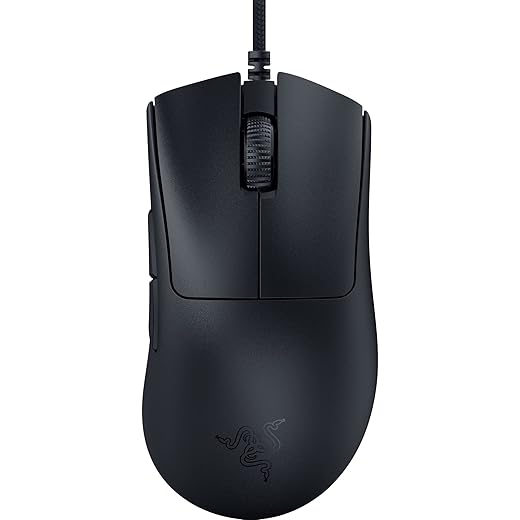
You get one of the lightest ergonomic mice available with class-leading tracking and ultra-low latency, making it an excellent choice if you prioritize speed and comfort. However, you should be aware of fewer onboard controls than some competitors and occasional reports of build inconsistencies.
Highly Customizable

You get a highly configurable, feature-rich mouse with excellent tracking and weight tuning, ideal if you want many buttons and a tailored feel for varied games. However, you should expect a bulkier, heavier package compared with lightweight esports mice and a cable that some find less premium.
Razer DeathAdder V3
Logitech G502 HERO
Razer DeathAdder V3
Logitech G502 HERO
Razer DeathAdder V3
Logitech G502 HERO
Design & Ergonomics — Shape, Weight and Build
Shape and grip fit
The DeathAdder V3 keeps the classic right-handed ergonomic hump but redesigned for esports: at 59 g it’s extremely light, favors fast, low-fatigue swipes, and best suits palm and relaxed claw grips if you want speed without effort. Its narrower front and gradual slope let you pivot quickly for target acquisition.


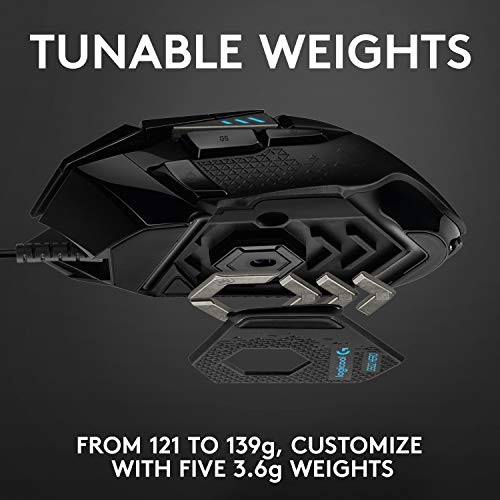
The G502 HERO is larger and chunkier with an angular, button-rich chassis. It’s heavier out of the box (adjustable via included weights) and favors palm grips or larger-clawed grips where stability and a planted feel matter more than raw flick-speed. If you need thumb reach for many macros, the G502’s larger thumb shelf and button layout are hard to beat.

Cable, button placement and scroll wheel
Build, finish and long-session comfort
Sensor & Performance — Accuracy, DPI and Polling
Sensor specs and what DPI means
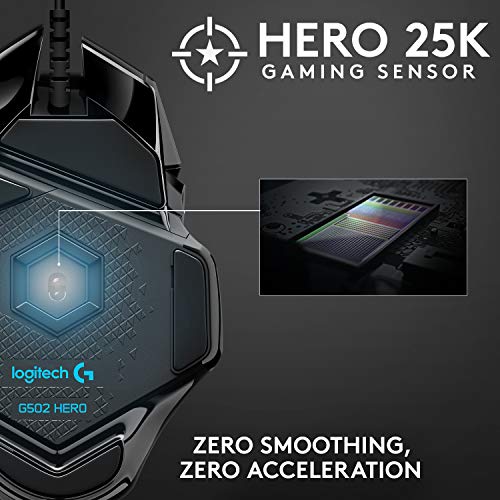
Razer’s Focus Pro 30K (30,000 DPI) and Logitech’s HERO 25K (up to 25,600 DPI) are both top-tier optical sensors. Higher DPI numbers mainly give you headroom — they don’t automatically make you more accurate. What matters is sensor consistency (no smoothing/acceleration) and how DPI maps to your in-game sensitivity (eDPI). For most players, anything above ~8,000–12,000 DPI is overkill; the extra range is useful only if you prefer extremely high sensitivity settings or need fine software scaling.


Polling rate and input latency
Polling rate determines how often the mouse reports position to the PC. Logitech’s G502 uses 1000 Hz (1 ms), while the DeathAdder V3 supports up to 8000 Hz (0.125 ms). In raw numbers, 8000 Hz reduces theoretical input latency versus 1000 Hz — but to notice the difference you need a high-refresh display, a responsive OS/USB stack, and very low in-game sensitivity. For most setups and players, 1000 Hz is already excellent; competitive, ultra-low-sense players may gain marginal benefits from 8000 Hz.
Real-world aiming, lift-off and tracking consistency
Both sensors handle fast flicks and long swipes without visible tracking loss. Lift-off distance (LOD) is more a firmware/firmware+mousepad combo than DPI — both mice can be tuned low in software or perform well by default. The HERO is proven for stable tracking across speeds and surfaces; Razer’s Focus Pro emphasizes surface compatibility (including glass) and slightly faster click-actuation together with its Gen‑3 optical switches for minimal click latency.
Feature Comparison Chart
Customization & Controls — Buttons, Software, and Tunability
Buttons & physical tunability
You get a clear split: the G502 gives you 11 programmable buttons and an adjustable weight system, so you can map dozens of functions and change balance on the fly. The DeathAdder V3 sticks to a performance-first, streamlined layout (about six buttons) focused on primary clicks and simple side bindings — less for macro-dense workflows, more for fast, mistake-free play.
Macro assignment and DPI stages
Both mice let you assign macros and create multiple DPI stages you can toggle in-game, but the workflow differs:

Software ecosystems: profiles, storage and RGB
You’ll use Logitech G HUB to build profiles, store them locally, or save a few to the mouse’s onboard memory; LIGHTSYNC handles RGB syncing across devices. Razer Synapse gives cloud sync, Chroma RGB integration, and per-app profile triggers. In short:
Macro latency and responsiveness
Raw reporting rate matters: G502 reports at 1000 Hz (1 ms), while the DeathAdder V3’s 8000 Hz HyperPolling offers far lower theoretical reporting latency. Software overhead can still add milliseconds, but if you prioritize absolute macro timing and minimal input lag, DeathAdder’s higher polling is an edge.
Who each suits
Comfort, Durability & Value — Long-Term Use and Price
Switch durability & warranty
You get clear longevity signals: the DeathAdder V3 uses Razer Optical Mouse Switches Gen‑3 rated for ~90 million actuations and benefits from Razer’s 2‑year manufacturer warranty. The G502 uses Logitech’s mechanical tension system (robust, proven) and also carries a 2‑year limited warranty. If raw click lifespan is critical, the DeathAdder has the spec advantage.
Maintenance, cables and scroll wheel wear
The DeathAdder’s ultra‑light, two‑piece design means fewer removable parts to lose or service; its Speedflex cable reduces drag and typically lasts longer in daily use. The G502’s dual‑mode metal scroll and adjustable weight bay add mechanical complexity — great for features but more moving parts that can wear or collect dust. Both will eventually need new PTFE skates and occasional cleaning; the G502’s removable weights slightly raise the chance of lost pieces.
Price, perceived value and Amazon street prices
Manufacturer warranties are comparable (2 years). On Amazon at the time of writing you’ll typically see the DeathAdder V3 around £50 and the G502 HERO around £30 — meaning the lighter, esports‑focused DeathAdder commands a premium for its sensor and hyper‑polling, while the G502 often undercuts it on price despite more features.
Practical recommendations
Final Verdict: Which Suits You?
If you prioritize a lightweight, esports focused ergonomic mouse with ultra fast polling and a clean two button layout, the clear winner is the Razer DeathAdder V3. You get 59 g weight, 8000Hz HyperPolling, Gen 3 optical switches, and a shape that suits claw and fingertip grips, ideal for FPS and fast paced competitive play.
If you need lots of programmable buttons, on board profiles, and weight tuning for MMO or MOBA or multi task workflows, choose Logitech G502 HERO. Its 11 buttons, adjustable weights, and HERO 25K sensor make it the more versatile power user option. Ready to commit? Pick the DeathAdder for speed or the G502 for customization — what will you prioritize?